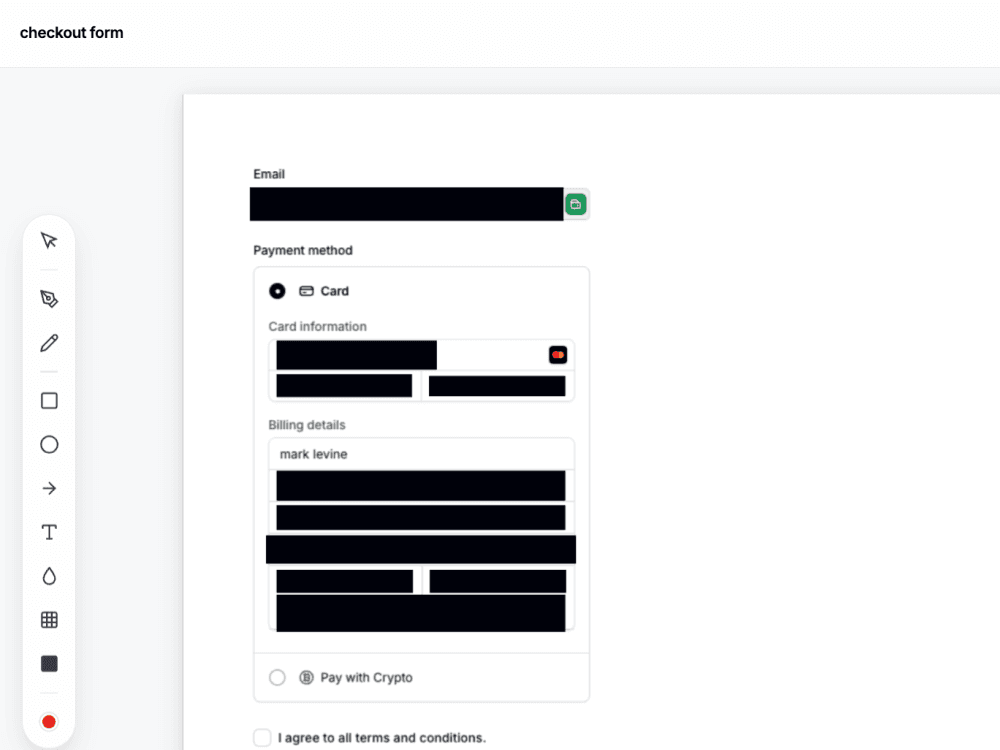
Secure screenshots
with auto-PII redaction.
Capture, mask sensitive customer data on-device, annotate the issue, and hand off a ticket-ready document — all without leaving your browser tab. Built for support, IT, and QA.
No account required. Unlimited JPG & WebP exports, no card.
One tab, from capture to clean handoff
The whole job in one place — no second editor, no re-uploading, no unredacted data leaking into Slack.
Capture anything
Full page, visible area, draw-region, element picker, or upload. Long dashboards stitched into one clean image.

Redact & annotate
Auto-mask emails, credit cards, and PII on-device, then drop numbered callouts showing exactly where to look.

Hand off to your tools
Copy to clipboard and paste into Slack, Notion, Jira, or docs. On Pro, attach straight to an existing Zendesk ticket — no download step.
Built for modern support, QA, and IT operations
Align your visual documentation with security requirements and engineering workflows.
Secure customer data in your support tickets
Never leak customer credit cards, emails, or credentials into Slack, Jira, or Zendesk. Our generalized heuristics engine runs entirely on-device to auto-mask Stripe checkouts and input fields, helping your team safeguard customer privacy.



Eliminate reproduction guesswork for developers
Save your engineering team hours of debugging. Every capture automatically appends an audit trail of metadata — including the source URL, viewport size, and timestamp — so developers know the exact environment where the bug occurred.
Publish professional, uniform documentation guides
Keep help center articles looking consistent. Crop raw screenshots to standard help-center ratios, apply rounded corners, and drop caption headers in seconds to match your company's design system.
Attach to Zendesk — or paste anywhere
Pro users connect Zendesk once with OAuth, then attach the current capture to an existing ticket — no download-and-upload. For Slack, Notion, Jira, and everything else, copy to clipboard and paste.
Edit and annotate captures in one tab
Explain the issue visually. Drop vector shapes, write notes, and add professional framing without opening an external image editor.
Draw crisp vector arrows, rectangles, and circles, or use the freehand pen and semi-transparent marker to highlight visual bugs directly on the page.

Start free. Go Pro when you're ready.
No credit card required to start. Free tier gets unlimited JPG & WebP exports — upgrade for PNG/PDF, on-device PII auto-redact, Zendesk attach, and Cloud Library.
Free
Everything to capture, annotate, and share — no sign-up.
no credit card required
Includes:
- Unlimited JPG & WebP exports
- All browser capture modes
- Full annotation toolbar
- Pixelate, blur & box redact tools
- Copy straight to clipboard
Lifetime
Own every Pro feature for life — no renewals, ever.
pay once, own forever
Includes:
- Everything in Pro, forever
- One-time payment — no renewals
- Auto-redact sensitive PII (on-device heuristics)
- High-fidelity PDF + comparison stitch
- Zendesk ticket attach (OAuth)
- No caption watermark
- Cloud Library (2 GB, cross-device)
- Up to 2 concurrent devices
- All future Pro updates included
Pro
Every Pro feature, billed your way. Cancel anytime.
billed monthly
Includes:
- Auto-redact sensitive PII (on-device heuristics)
- No caption watermark
- PNG & high-fidelity PDF export
- Side-by-side comparison stitch
- Zendesk ticket attach (OAuth)
- Cloud Library (2 GB, cross-device)
- Up to 2 concurrent devices
Frequently
asked questions
Have questions about how SnapFrame handles data, security, pricing, or team licensing? Here are all the details.
Does SnapFrame upload my screenshots or customer data anywhere?
No. Captures and redactions are processed entirely on your device. Nothing is uploaded to our servers unless you explicitly opt-in and turn on the Cloud Library (Pro feature).
What sensitive data can auto-redact detect?
Is SnapFrame SOC 2, HIPAA, or GDPR compliant?
Can I buy licenses for my whole support or IT team?
Does it integrate directly with Zendesk, Jira, or Slack?
Is SnapFrame free to use?
Stop tab-hopping for one screenshot
Capture, redact, and document — all in your browser, all in SnapFrame.
Start free. No account, no card, no catch.